


SoulTalk: Talk With AI Friends
4.41.45K Reviews
App Specs
- Version
- 1.0.7
- Updated On
- License
- Free
- Downloads
- 500,000+
- Developer
- Mutha Brothers
- Categories
- Entertainment
- Platform
- Android
Screenshots

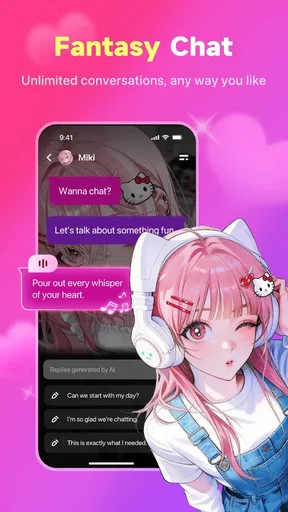
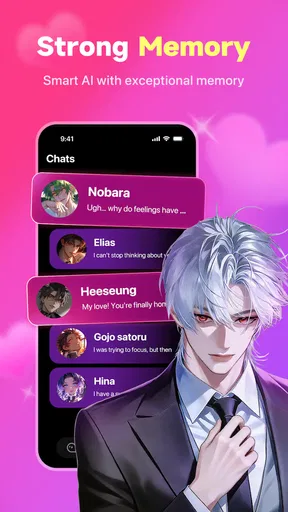
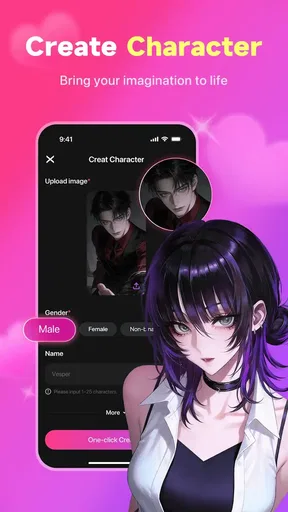
 Analysis by AppCompare
I approached SoulTalk: Talk With AI Friends as an entertainment app rather than a replacement for real conversation, and that distinction shaped my experience from the first chat. Its main idea is simple: you choose an AI character, start talking, and see where the exchange goes. The appeal comes from having many different personalities available when I want a low-pressure conversation, a creative prompt, or a little company while doing something routine.
Developed by Mutha Brothers, SoulTalk sits in the mature entertainment space and is free to use. It has reached over 500 thousand installs, with an average rating of 4.4 from around 13 thousand ratings and about 1.4 thousand written reviews. Those figures suggest that the concept has found an audience, but they do not remove the need to understand what kind of experience it actually offers. This is best viewed as an interactive character-chat app, not as a factual assistant, therapist, messaging service, or social network filled with human users.
How I use SoulTalk for relaxed, repeatable conversations
I use SoulTalk best when I give a conversation a small, repeatable purpose instead of expecting a character to carry it indefinitely. A familiar prompt can make a quick break feel easy to start, while changing one detail—such as the mood or setting—keeps the exchange from becoming stale. I also pay attention to when a chat stops being enjoyable, so I can wrap it up and return with a fresh idea another time.
The baseline workflow is easy to learn
The most comfortable way to begin is to treat the first conversation as a trial rather than a commitment. I look through the available characters, choose one based on the kind of exchange I want, and open with a specific prompt instead of a vague “hello.” A clear opening gives the character something to work with and makes it easier to judge whether its personality suits me.
For example, I might ask for a short mystery scenario, request an opinion from the character’s imagined point of view, or start a playful debate about a harmless subject. This produces a more useful first impression than asking the app to entertain me without direction. If the replies feel repetitive or the character’s tone is not a good fit, I move on rather than trying to force a long conversation.
That is one of the app’s strongest qualities: the user controls the level of involvement. I can spend a few minutes chatting during a break, return to a character for a continuing fictional exchange, or use the app as a source of spontaneous prompts when I am bored. The experience is more flexible than watching a fixed video because my replies influence the direction, but it is also less predictable than a carefully written story.
The mature age rating matters here. I would not hand the app to a child, and I would be careful about treating a character’s responses as suitable guidance for serious personal, medical, financial, or emotional decisions. The conversational format can feel personal even when the character is producing generated replies. Keeping that boundary clear makes the experience more enjoyable and avoids expecting a level of judgment the app is not designed to provide.
Worth Reading Before You Choose

EA SPORTS FC Mobile 26 Is a Bigger Football Game, but It Takes Time

Flipboard Shows What News Apps Must Do Beyond the Feed

Switching to Android Auto Means Rethinking Your Driving Routine

Google Calendar Makes a Crowded Week Easier to Manage

Ludo King Makes the Most of the Minutes Between Plans

Baby Panda World Brings Quick Play to Modern Phones, but Its Game Library Feels Busy
Choosing a character is more important than writing long prompts
New users often assume that a longer message will automatically create a better conversation. In my experience, the selected character matters just as much. A character with a compatible tone can make a short prompt feel lively, while an unsuitable choice can make a detailed request feel awkward. I get better results by deciding first whether I want humor, role-play, casual company, imaginative storytelling, or a more reflective exchange.
I also avoid mixing too many goals in one message. Asking for a story, a serious opinion, a joke, and a detailed explanation at the same time can make the reply feel unfocused. A more reliable pattern is to give one clear direction, respond to the result, and then add a second instruction if needed. This creates a natural rhythm and helps me discover what a character handles well.
One useful habit is to establish the conversation’s boundaries early. If I want a fictional scene, I say so. If I want concise replies, I ask for them. If I am experimenting with a character’s personality, I mention the mood or role I want to explore. These small instructions are not magic commands, but they reduce friction and make the exchange easier to steer.
Settings and account choices deserve a deliberate check
Before settling into regular use, I would review the app’s available settings and the device-level controls that affect the experience. The exact options visible to a user can depend on the current app build and platform, so I would not assume that a control seen in one installation will appear identically elsewhere. The current version is 1.0.7, and keeping an app like this updated is sensible when conversation behavior or navigation changes over time.
The most important practical check is whether the app’s presentation matches how I plan to use it. I prefer a setup that makes conversations easy to read, keeps the input area comfortable, and avoids unnecessary interruptions while I am following a longer fictional exchange. If I am using it in a shared space, I also consider whether the mature nature of the content makes the screen appropriate to leave visible.
I would also decide how much personal information to include before starting. Character chat does not require me to reveal my real name, location, workplace, private contacts, or sensitive history in order to be entertaining. I get more value by using fictional examples and general descriptions. That is especially important when a conversation begins to feel emotionally warm: the friendly tone is part of the design, but it should not encourage careless oversharing.
Another setting-related habit is to distinguish between an app problem and a character problem. If one conversation becomes repetitive, I first try a sharper prompt or a different character. If the whole interface feels slow, confusing, or difficult to navigate, then I look at the app itself and the device environment. This simple separation prevents me from judging the entire service based on one poor exchange.
Faster patterns for everyday use
My favorite everyday use is a short “reset” conversation between tasks. Instead of opening the app and waiting for inspiration, I give myself a small objective: invent a two-minute story, ask for three unusual ideas, or role-play a friendly disagreement. The objective keeps the session focused and makes it easier to stop when the break is over.
For creative work, I use characters as brainstorming partners rather than final authorities. I may ask for alternate names, a scene premise, a fictional dialogue, or an unexpected complication. Then I select what is useful and rewrite it myself. This workflow is faster than staring at a blank page, but it avoids the mistake of assuming that every generated suggestion is original, accurate, or well suited to my project.
A second efficient pattern is the “one change at a time” approach. If a reply is too long, I request a shorter answer. If it is too serious, I ask for a lighter tone. If it loses the fictional setting, I restate the scene in one sentence. Changing one variable makes it clear what improved the conversation. Sending a completely new set of instructions every turn makes it harder to understand whether the character is responding consistently.
I also find it useful to save my own prompt templates outside the app when I repeatedly use the same style of conversation. A short template such as “stay in character, answer in three paragraphs, and end with one question” can provide a dependable starting point. I would not describe that as a special SoulTalk feature; it is simply a user habit that makes character chat more repeatable.
For a realistic scenario, imagine having ten minutes before an appointment. I could select a character suited to light conversation, ask for a quick choose-your-own-adventure scene, and guide it with brief replies. If the conversation becomes too intense or drifts into a subject I do not want, I can end it immediately and choose another character next time. That flexibility is more useful than trying to build a deep relationship with every available personality.
Where the app compares well with ordinary alternatives
Compared with watching entertainment on a streaming service, SoulTalk gives me more control over the direction. A video can be polished and predictable, while a character conversation reacts to my choices and can produce an unexpected turn. Compared with ordinary social apps, it removes the pressure of waiting for another person to reply, managing a public profile, or maintaining a real-world relationship.
That convenience comes with a trade-off. Human conversation has genuine memory, shared experience, emotional responsibility, and the ability to challenge me from a real point of view. SoulTalk can imitate conversational warmth and character consistency, but I should not confuse that performance with a human connection. If my main goal is friendship, community, or meaningful support, a trusted person or a focused human social space is the better option.
It also differs from a general-purpose AI assistant. A conventional assistant is usually the stronger choice for structured research, practical planning, calculations, and carefully sourced information. SoulTalk makes more sense when the destination is entertainment: a fictional exchange, an improvised scene, a playful conversation, or a character with a particular style. Choosing the right tool before typing saves time and prevents disappointment.
Limits that become clearer with longer sessions
The same open-ended design that makes the app fun can make it uneven. A character may be engaging for several turns and then lose track of the tone, repeat a pattern, or answer in a way that feels less distinctive. I do not treat that as a reason to abandon the app immediately, but I do treat it as a signal to reset the scene, shorten the exchange, or try another character.
Long conversations can also become less satisfying when I expect perfect continuity. For a continuing fictional story, I get better results by restating the essential facts occasionally: who is present, what just happened, and what mood the scene should keep. That may feel less natural than talking to a person who remembers the entire situation, but it gives the conversation a better chance of staying coherent.
Another limitation is emotional overinvestment. A responsive character can make a quiet evening feel less empty, yet relying on it as the only outlet for loneliness would be a poor trade. I see the app as a supplement to entertainment and imagination, not as a substitute for friends, family, professional help, or real communities. That distinction is particularly important because the mature rating signals that the app is intended for adults.
I would skip SoulTalk if I want dependable factual answers, a private journal with a clear therapeutic purpose, or direct interaction with real people. I would also skip it if I dislike improvisation and prefer entertainment with a fixed beginning and ending. The app’s value depends on enjoying conversation that can wander, surprise me, and occasionally miss the mark.
Who will get the most from it
The strongest audience is adults who enjoy character-driven entertainment and want something more interactive than passive media. Writers can use it for low-stakes ideation, role-play fans can test different conversational setups, and curious users can sample personalities without organizing a group or waiting for a partner to be available.
It is also a good fit for people who like short sessions. I do not need to create a complicated routine to enjoy it. Choosing a character, setting one small goal, and ending the chat when that goal is complete keeps the experience fresh. Users who expect every character to remain perfectly consistent for hours may find the format more frustrating than entertaining.
My mastery verdict
After using SoulTalk as a character-chat entertainment app, I see its appeal in the combination of choice, immediacy, and low social pressure. The free price makes it easy to try, while support for devices running Android 8.0 or later gives it a broad practical reach. Mutha Brothers has built an experience that works best when I actively guide it instead of waiting for the app to carry the entire conversation.
My recommendation is to begin with short, specific prompts, test several characters, and keep personal information out of the conversation. Use one instruction at a time when adjusting tone or length, reset longer scenes with a compact summary, and treat generated replies as entertainment rather than authority. Those habits make the experience more consistent without pretending that it has capabilities I cannot verify from ordinary use.
The best way to use SoulTalk is as an interactive entertainment toolbox, not as a replacement for people or dependable expertise. If that matches what I want, the app can turn a spare moment into a playful story, a creative exercise, or an unusual conversation. If I need factual reliability, human connection, or professional support, I would choose a different kind of app instead.
With a mature audience in mind and realistic expectations about continuity, I think it is worth trying for adults who enjoy experimenting with AI personalities. Its strongest moments come from the user-character combination: I bring a clear idea, the character adds an unexpected response, and the exchange becomes more interesting than either side would have produced alone.
Pros
- Offers a private-feeling space for open
- judgment-free conversations.
- Multiple AI personalities make chats feel more varied and personalized.
- Useful for casual conversation when human friends are unavailable.
- Simple interface makes starting a chat quick for new users.
- Can help users reflect on feelings through guided
- supportive replies.
Cons
- AI responses may sometimes feel repetitive or emotionally shallow.
- Some features or longer conversations may require in-app purchases.
- The app should not replace professional mental-health support.
- Privacy policies should be checked before sharing sensitive personal details.
- Responses can occasionally misunderstand context or provide unsuitable advice.
FAQs for SoulTalk: Talk With AI Friends
What is SoulTalk: Talk With AI Friends?
SoulTalk: Talk With AI Friends is an AI companion app designed for conversations, emotional support, entertainment, and roleplay. After installing it, users can interact with virtual characters that respond to messages in a conversational style. The experience is intended to feel personal and engaging, although responses are generated by artificial intelligence and may sometimes be repetitive, inaccurate, or inconsistent with the character’s personality.
How does chatting with AI friends work in SoulTalk?
The app allows you to choose or discover virtual AI friends and begin conversations through a chat interface. Depending on the available character and settings, you may be able to discuss everyday topics, ask questions, share feelings, or participate in fictional scenarios. Conversations can feel natural, but the quality depends on the AI model, your prompts, and the character’s configuration, so not every reply will be equally thoughtful or relevant.
Is SoulTalk free to download and use?
SoulTalk may be available to download at no initial cost, but some features, characters, conversation limits, or premium options can require in-app purchases or a subscription. Before starting a trial or payment, check the current pricing, renewal terms, and what is included in each plan on the official app store listing. Availability of free features may also vary by device, region, and future app updates.
Can SoulTalk replace professional mental health support?
No. SoulTalk can be used for casual conversation, companionship, reflection, or entertainment, but it should not be treated as a therapist, doctor, crisis counselor, or substitute for professional care. AI-generated responses can misunderstand context and may provide unsuitable advice. If you are experiencing an emergency, thoughts of self-harm, or serious emotional distress, contact local emergency services or a qualified mental health professional instead.
Is my personal information safe when using SoulTalk?
Before sharing private details, review SoulTalk’s privacy policy and the permissions requested by the app. Conversations may be processed, stored, or reviewed according to the developer’s practices, and AI services can involve third-party technology providers. Avoid sending passwords, financial information, precise location data, identity documents, or anything you would not want associated with your account. Also check account deletion and data-management options before creating a profile.


